Your AI Visibility Analyst.
Always On. Always In Context.
Most AI visibility tools show you a dashboard and leave you to interpret it. CiteMetrix gives you a conversational AI strategist who already knows your data — ready to answer follow-up questions in plain English, anywhere you work.
The Conversational Layer No Competitor Has
Dashboards alone aren’t enough
You can stare at a ModelScore drop for an hour and still not know why. You can read a Citation Gaps report and still not know which one to fix first. AI visibility data is rich and unfamiliar — and most platforms hand you the data and walk away.
CiteMetrix Analyst™ is the conversational layer on top of every CiteMetrix surface. It already knows your domain, your scores, your competitors, your hallucinations, your platforms. Ask it anything and get a real answer — not generic AI advice, but an analysis grounded in your specific data.
A Scenario You’ve Actually Had
Tuesday morning. Weekly review. You open the Citation Gaps page for your largest client. Perplexity citation rate is down from 67% to 41%. Sharp drop, no obvious cause.
You click Ask the Analyst. The purple slideout opens, already aware you’re on the Citation Gaps page for this domain. You type:
“Why did Perplexity drop?”
The Analyst answers:
“The drop is concentrated in three queries: ‘best wellness retreats,’ ‘spa retreats with medical programs,’ and ‘Larkspur Mesa Retreat reviews.’ Two of these were citing your stress-management blog post, which Perplexity stopped indexing on April 14th. The third now cites TripAdvisor instead. Recommended: refresh the blog post with a 2026 update, and add Product schema to your retreat program pages. The Schema Advisor tool can generate the markup in two clicks.”
Total time: 30 seconds. The kind of answer a human consultant would give after spending half an hour with the data — delivered while you were still on the page that made you ask the question.
What It Looks Like
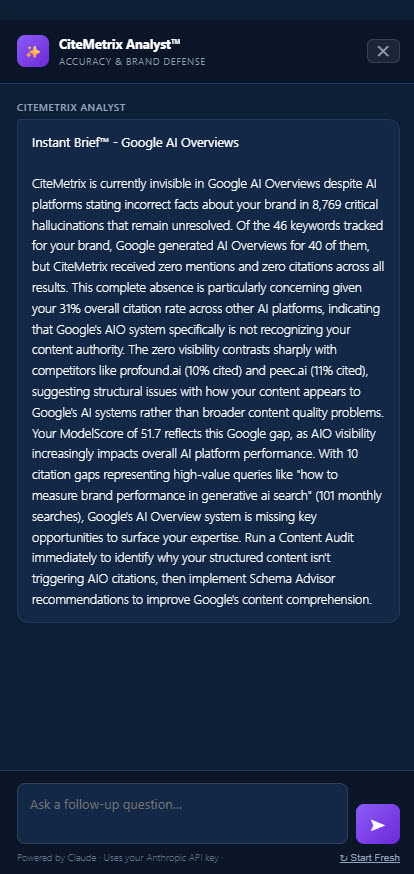
Click image to enlarge
The Analyst opens as a right-edge slideout on every analytical page — ModelScore, Accuracy, Citation Gaps, Google AIO. Conversation persists per page; ask follow-ups without losing context.
Three Places You’ll Meet the Analyst
On every analytical page
Click “Ask Analyst” on ModelScore, Accuracy, Citation Gaps, or Google AIO and the purple slideout opens with full context of the page you’re on. Ask why a metric moved, what to fix first, how a competitor is winning a query — the Analyst answers using your real data, not generic advice.
On every report
Click “Ask the Analyst” at the top of any generated report. AI Visibility Reports, Monthly Progress Reports, Competitive Intelligence Reports, Content Opportunity Reports — the Analyst can interpret any of them. Ask follow-up questions about the numbers, the comparisons, the recommendations. Responses are emailed and saved to Past Analyses.
On your phone
Tap any push alert in the mobile dashboard and the Analyst opens with a personalized brief on what just happened. Ask follow-ups by typing or by voice. Per-alert chat threads persist, so you can pick up where you left off — even from a different device.
What Makes It Different
Grounded in your data
Not a wrapper around ChatGPT. The Analyst pulls your actual ModelScore, citation rate, hallucinations, competitor data, brand facts, and platform-specific results into every answer. A pharma brand asking about clinical accuracy queries gets a completely different answer than a SaaS company asking about feature comparisons.
Conversational, not query-and-response
Every Analyst surface is a real chat thread. Ask a question, get an answer, ask a follow-up that builds on the prior answer. Threads persist across sessions and devices — pick up a conversation on your phone that you started on the desktop slideout.
Voice-enabled on mobile
On the mobile dashboard, tap the microphone and ask your question out loud. Useful when you’re walking into a meeting and want to know what changed before the chairs are filled. Powered by your phone’s native speech recognition — no extra setup.
BYOK-aware
Bring your own Anthropic API key and the Analyst runs on your account — your data stays private, your costs stay transparent. Don’t have a key? The platform fallback handles it at no extra cost. Either way, every user gets a real generated response, not a canned template.
No Competitor Does This
| Platform | Starting Price | Conversational AI | Page Context Awareness | Mobile Conversational AI | Analyst System |
|---|---|---|---|---|---|
| Profound | $99/mo* | ✗ | ✗ | ✗ | ✗ |
| Otterly | $29/mo | ✗ | ✗ | ✗ | ✗ |
| Peec AI | €89/mo | ✗ | ✗ | ✗ | ✗ |
| Brandlight | $4,000+/mo | ✗ | ✗ | ✗ | ✗ |
| SEMrush AI Toolkit | $99/mo add-on | ✗ | ✗ | ✗ | ✗ |
| Scrunch AI | ~$300/mo | ✗ | ✗ | ✗ | ✗ |
| CiteMetrix | $79/mo | ✓ Claude | ✓ | ✓ + voice | ✓ Included |
* Profound Starter ($99/mo) tracks ChatGPT only with 50 prompts. Growth plan is $399/mo. Full multi-platform coverage requires Enterprise custom pricing (~$2,000+/mo). Comparison data as of October 2026.
Common Questions
Stop Guessing. Start Asking.
Every CiteMetrix plan includes the Analyst. Available on every page, every report, and on your phone — from the moment you log in.
See Plans and Pricing