The CiteMetrix dashboard, in your pocket
When AI shifts how it talks about your brand, the alert is on your phone in under three seconds. Tap it. Ask the Analyst what it means. Get an answer in plain English — from the parking lot, the elevator, or the cab to your meeting. No app store. No download. No native build to maintain.
Why mobile matters for AI visibility
AI changes how it talks about your brand on its own schedule — not yours. A new model release, a quiet ranking update, a competitor’s content push, an autocorrected hallucination that becomes a confident answer. By the time you sit back down at your desk, the meeting where it mattered is already over.
CiteMetrix’s mobile dashboard solves this. Real findings, surfaced where you actually are — with the Analyst built in, so you can drill into what an alert means without waiting for a desk.
A scenario you’ve actually had
9:04 AM, Tuesday. You’re walking from the parking lot to a 9:15 stakeholder meeting about your largest client’s brand visibility. Your phone buzzes:
Larkspur Mesa Retreat: 32 new accuracy issues (8 critical)
You tap it. The Analyst opens with a personalized brief: “Larkspur Mesa Retreat just had 32 new AI accuracy issues detected across platforms in the last scan cycle, with 8 being critical-level hallucinations where AI is stating incorrect facts about the brand …” You ask: “Which platforms?” The Analyst answers: “Mistral and Perplexity account for 6 of the 8 critical issues, mostly around the wellness retreat program …”
9:14 AM. You walk into the meeting knowing what changed, where, and why. Your competitor is still waiting for tomorrow’s email digest.
What you get on your phone
Real-time push alerts
The moment an AI platform shifts how it talks about your brand, your phone buzzes. ModelScore drops, accuracy issues flagged, scans completing — severity-aware, with critical alerts bypassing quiet hours and routine alerts batched into a 7am morning digest. Sub-3-second delivery from cause to lock screen.
Ask the Analyst, anywhere
Tap any alert. The CiteMetrix Analyst opens with a personalized brief explaining what just happened in plain language — then answers your follow-up questions about platforms, severity, specific claims, or what to do about it. Per-alert chat threads persist across sessions. Same conversational AI that runs on your web dashboard, now in your pocket.
Voice-enabled queries
Tap the microphone. Ask your question out loud. Get an answer back. Walk into a meeting unprepared, ask your phone what changed, get caught up before the chairs are filled. Powered by your phone’s native speech recognition — no extra setup, no separate API, no learning curve.
The full dashboard, mobile-first
ModelScore, citation rate, alerts feed, all your domains. Switch between clients with one tap. The same data your team sees on the web, optimized for the screen in your hand. Same login. Same JWT-secured access. Same domain ownership rules.
Quiet hours that respect your sleep
Push notifications pause from 10pm to 7am in your timezone. Alerts during those hours appear in the feed immediately so the dashboard stays current — but the buzz waits until morning, delivered as a single digest push. Critical-severity alerts bypass quiet hours, because some things genuinely can’t wait.
Same security, mobile context
JWT-authenticated. HTTPS everywhere. Per-domain ownership checks on every request. Your scan data still uses your BYOK API keys — nothing changes about the data privacy model just because you’re on a phone. The mobile dashboard inherits the same security guarantees as the web platform.
What it looks like
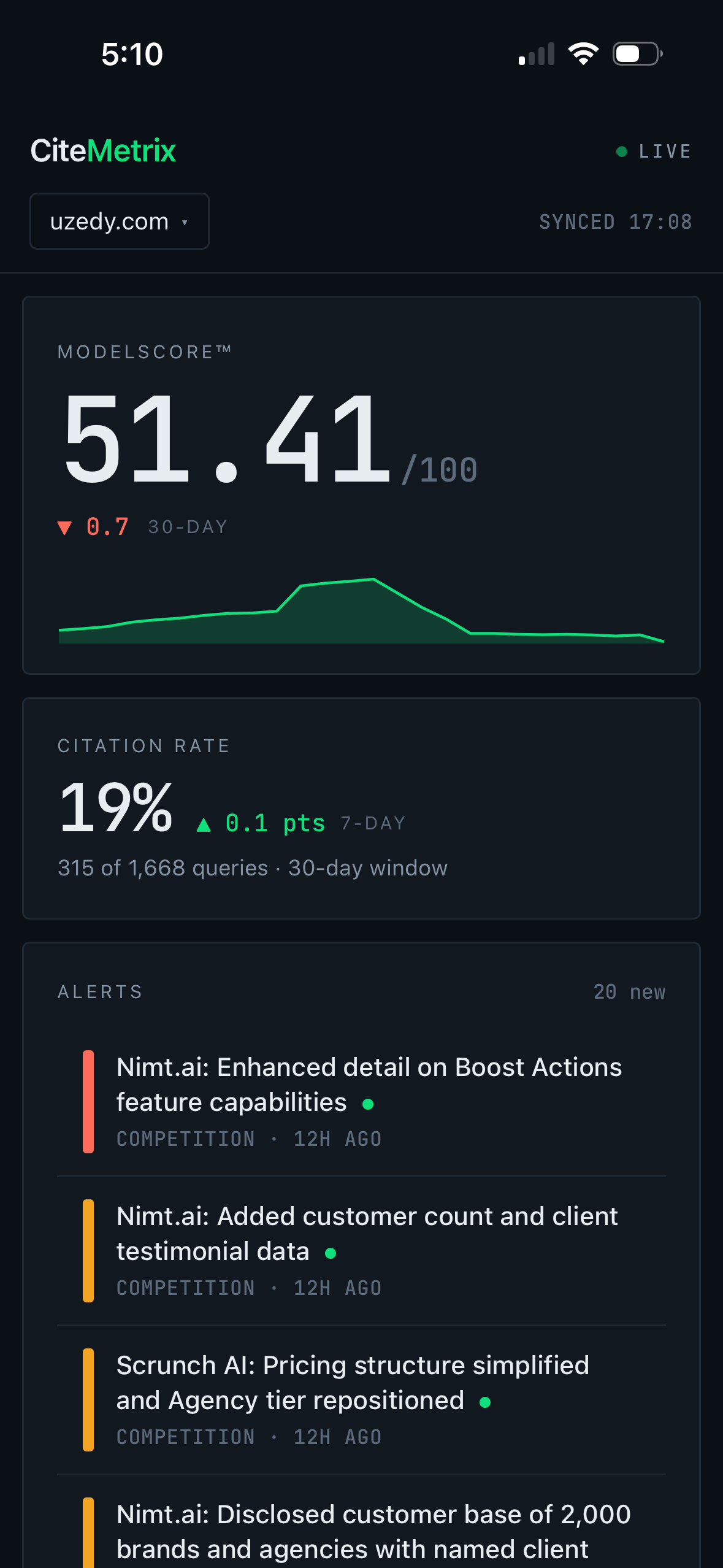
Dashboard
ModelScore at the top. Citation rate. Alerts feed below, severity-color-coded. Tap to expand. Tap “Ask the Analyst” to drill in.
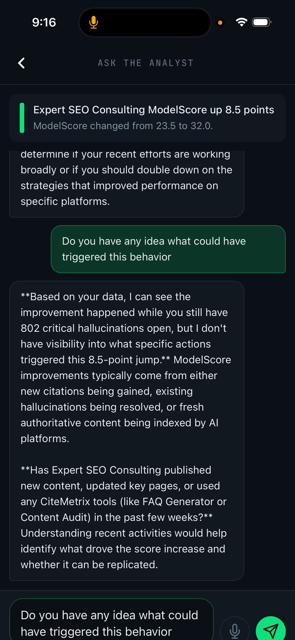
Ask the Analyst
Personalized brief opens automatically. Type or speak follow-up questions. Conversation persists per alert.
Why no app store
CiteMetrix’s mobile dashboard is a Progressive Web App — a modern web application that installs from your browser to your home screen and behaves like a native app. No App Store review. No Google Play submission. No native iOS or Android build.
For you: it’s instant. Visit the URL, tap “Add to Home Screen,” and you have an app icon in 15 seconds — no 200MB download, no permissions wizard, no platform tax. For us: we ship updates the moment they’re ready, not when Apple’s review queue clears. When we add a feature, you have it that day.
Get it on your phone
iPhone & iPad (Safari)
- Open Safari and visit app.citemetrix.com
- Sign in with your CiteMetrix account credentials
- Tap the Share button (square with up-arrow) at the bottom of the screen
- Scroll down and tap Add to Home Screen
- Tap Add in the top right
Requires iOS 16.4 or later for full push notification support.
Android (Chrome)
- Open Chrome and visit app.citemetrix.com
- Sign in with your CiteMetrix account credentials
- Tap the three-dot menu in the top right
- Tap Install app (or Add to Home screen)
- Confirm Install
Push notifications work on Android 5.0+ in Chrome 50+.
Desktop browsers (Chrome, Edge, Brave) also support PWA install via the address bar — useful for keeping the dashboard one click away on a second monitor.
One platform. Every device. Wherever you are.
The monitor-to-fix story you already know — monitor → detect → diagnose → fix — doesn’t change because you’re on a phone. The mobile dashboard is the same intelligence, the same data, the same Analyst. It just meets you where decisions actually happen: between meetings, in transit, in the field. Not glued to a desk.
See it on your own brand — Free
Get a free AI visibility score in under 2 minutes. No account required. Then install the mobile dashboard and watch your brand in real time.
Get Your Free Score