By Eric Richmond, CiteMetrix
A page cannot be cited by an AI system if the system cannot read it.
That sounds obvious, but crawler access has often been treated as a background technical setting: something for developers, infrastructure teams, or a robots.txt review once a quarter.
That is changing.
In Zyppy Signal’s September 16, 2026 survey, more than 130 search experts rated “AI Crawl Access & Snippet Eligibility” as the most important factor affecting whether a page is surfaced or cited in Google AI answers. It scored +2.20 on a seven-point scale, ahead of query-answer match and brand or entity memory.
As Fili Wiese of Search Brothers put it in the survey:
“Access works as a hard gate ahead of any ranking consideration.”
That is the important distinction. Content quality, authority, and brand knowledge matter, but they matter after a system can access and use your content.
Your crawler settings are now part of your visibility strategy.

Three permissions, not one
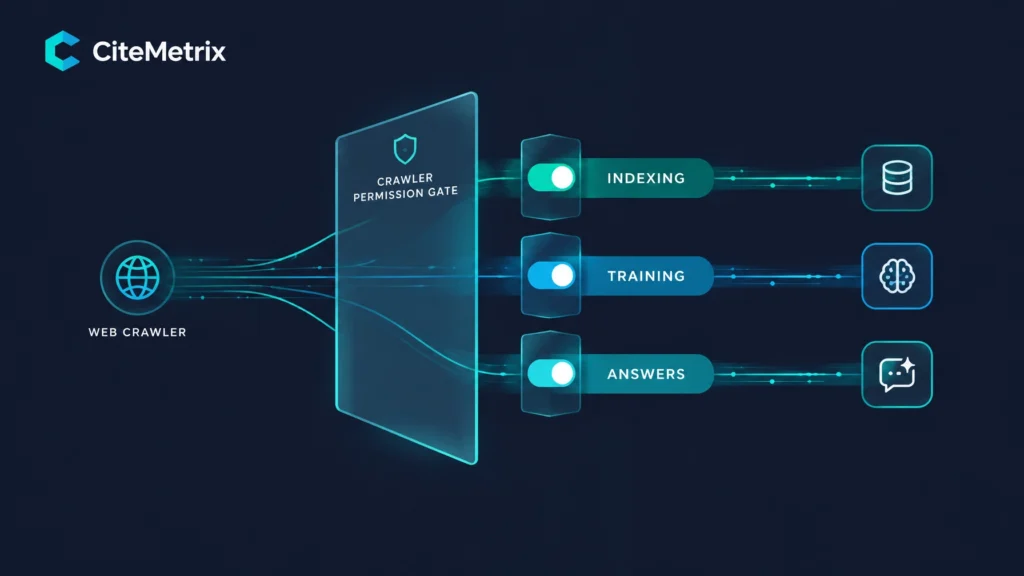
Many teams still think of AI access as a single yes-or-no decision. In practice, there are at least three separate permissions to manage.
1. Search indexing
This answers:
Can a search crawler access and index the page so it can appear in traditional search results?
This is the familiar permission. It involves crawlers such as Googlebot, Bingbot, and Applebot, along with directives such as robots.txt, noindex, and server access controls.
If you block these crawlers, you may lose traditional search visibility.
2. AI training
This answers:
Can a provider use your content to train or improve its models?
Google-Extended and Applebot-Extended are examples of dedicated controls for this type of use.
A publisher may reasonably decide that its articles, reporting, or subscriber content should not be used for training. A brand may make a different decision because it wants AI systems to understand its products, services, and expertise.
Opting out of training does not automatically remove a brand from AI-generated answers. It is a separate decision from whether a search or answer crawler can access a page.
3. AI answers
This answers:
Can an AI search or answer system access and use your content as a source for a generated response?
This is the permission most brands are now trying to understand. It includes the crawlers and retrieval systems that feed experiences such as ChatGPT search, Perplexity, Google AI Overviews, Gemini, Claude, and other answer surfaces.
There is not one universal “AI answers” switch across every provider. Access may be influenced by:
- The specific crawler being used
robots.txtdirectives- CDN or WAF rules
- Snippet and preview controls
noarchive,nosnippet, or related meta directives- Whether the system can retrieve the page and receive a usable response
The three permissions overlap, but they are not interchangeable.
Blocking a crawler does not improve your ranking. Opting out of training does not necessarily stop a system from citing you. And allowing Googlebot does not prove that ChatGPT search or another AI answer crawler can reach the same page.
The Cloudflare change exposed the difference
On September 15, 2026, Cloudflare launched a Disallow AI Training setting designed to let site owners refuse AI training while keeping major search crawlers active.
According to Cloudflare, the setting writes training directives for Google-Extended and Applebot-Extended into robots.txt, while allowing Googlebot, Applebot, and Bingbot for search. The setting is available across Cloudflare plans, including the free plan.
That is a useful separation, but the rollout also produced an unexpected visibility signal.
A September 18 analysis from Semrush cited SeenSure testing of 1,046 websites before and after the change. Among the Cloudflare sites tested, refusals from OAI-SearchBot, the crawler associated with ChatGPT search, fell from 16.9% to 3.0% after the change.
At the same time:
- GPTBot refusals rose from 18.9% to 22.0%
- ClaudeBot refusals rose from 19.9% to 22.8%
- The approximately 300 non-Cloudflare sites in the test remained broadly flat
These figures are from SeenSure, as reported by Semrush, not from CiteMetrix, and they should be treated as directional. The Cloudflare rollout is still recent, and crawler classification and site settings can change as providers implement the new controls.
But the pattern is important: a setting intended to manage training access changed the apparent availability of AI search access for some sites.
That is exactly why crawler policy can no longer be treated as a purely technical concern.
A practical crawler access audit
Before changing your settings, document what you want each permission to do. Then audit the implementation from several angles.
1. Read your robots.txt directly
Open:
https://yourdomain.com/robots.txt
Look for directives affecting:
Google-ExtendedApplebot-ExtendedGooglebotBingbotApplebotOAI-SearchBotGPTBotClaudeBot
Do not assume that a friendly dashboard setting produced the policy you intended. Read the live file.
2. Confirm search crawlers are allowed
If your objective is to remain visible in traditional search, verify that Googlebot, Bingbot, and Applebot are not being blocked by a broad rule such as:
User-agent: *
Disallow: /
Also check for more specific rules that override general permissions.
3. Check the answer crawlers separately
A site may allow Googlebot while blocking the crawler that supports an AI answer product.
If your visibility program includes ChatGPT search, for example, check whether OAI-SearchBot is allowed. If you care about other platforms, identify their documented crawlers and evaluate them individually.
The question is not simply “Are AI bots allowed?”
The better question is:
Which AI crawlers are allowed, and what job does each one perform?
4. Inspect CDN and WAF controls
A robots.txt review is not enough.
Your CDN, firewall, bot-management platform, hosting provider, or security layer may block crawlers before they ever reach the page. Those rules will not appear in robots.txt.
Look for:
- Bot scores that challenge or reject automated requests
- User-agent blocks
- Country or IP restrictions
- Rate limits
- JavaScript or CAPTCHA challenges
- Rules that return 403, 406, or 429 responses
A crawler that receives a blocked response cannot use your page, regardless of what robots.txt says.
5. Verify server logs and status codes
Use server logs or CDN analytics to confirm that desired crawlers are reaching your site and receiving clean responses.
For important pages, look for:
- The crawler user agent
- Request date and frequency
- Requested URL
- Response status
- Redirect chains
- Response time
A successful request should generally produce a usable 200 status code. A crawler that repeatedly receives errors, redirects, or challenges may be technically “allowed” but practically unable to read the content.

6. Review Bing’s current limitation
Semrush and related coverage note that Bing is not expected to honor the new no-training robots.txt preference until early 2027.
Until then, the current Bing lever is the NOARCHIVE meta directive:
<meta name="robots" content="noarchive">
This is a separate control from search indexing. It is also not a complete substitute for a provider-specific training preference. Treat it as a current operational option, not a permanent solution.
The business decision behind the settings
There is no universally correct crawler policy.
A publisher that relies on advertising or paid subscriptions may reasonably decide to refuse AI training. It may want search discovery while limiting how much of its original reporting is reused to build commercial AI systems.
A software company, professional services firm, or consumer brand may make the opposite decision. It may want AI platforms to understand its products, recognize its expertise, and recommend it when users ask for solutions.
Both policies can be rational.
What is not rational is assuming that one blanket “block AI” setting expresses your actual business intent.
There is also an important caveat: nobody has publicly quantified exactly how much training inclusion contributes to future brand recommendations. Training may influence what a model knows, but it is not a guaranteed path to citations, rankings, or recommendations.
That uncertainty is a reason to measure, not a reason to ignore the decision.
Crawler policy belongs inside brand knowledge governance, with marketing, legal, product, infrastructure, and content operations involved. The team should agree on which content can be indexed, which content can support answers, and which content can be used for training.
Measure the change instead of assuming it worked
A settings change is not complete when someone clicks “save.”
You need to verify that the desired crawlers actually arrived, read the intended pages, and that visibility changed, or did not change, afterward.
That is where CiteMetrix closes the loop.
- AI Crawlers analysis shows which AI crawlers visited your site, when, and how often: traffic your regular web analytics does not show.
- Robots Analyzer reads and interprets your robots.txt directives for AI crawlers.
- Technical Readiness contributes 15% of your ModelScore and covers areas such as schema, crawlability, and llms.txt.
- Site Crawl discovers up to 500 pages, three levels deep, at one request per second while respecting robots.txt. Starter plans support up to 250 pages; Professional and above support up to 500.
- llms.txt Generator and Entity Map Generator help remediate technical and entity-level gaps.
- Content Change Tracker snapshots page structure and content on every scan, helping you compare a crawler setting change with citation movement in the same period.
The workflow is simple:
Monitor → Detect → Diagnose → Fix → Verify
That is the difference between publishing a crawler policy and managing AI visibility.

Crawler access is now part of your visibility strategy
The practical takeaway is not “allow every crawler.”
It is to separate your decisions.
- Do you want traditional search indexing?
- Do you want AI platforms to use your pages in generated answers?
- Do you want to allow or refuse model training?
- Which content should have different rules?
- How will you verify that the policy is working?
The brands that answer those questions deliberately will have a clearer view of how they appear across AI search.
CiteMetrix brings nine core visibility features together, with nine AI platforms included on every plan at $79 per month.
See what AI says about your brand → citemetrix.com
Get your ModelScore, inspect your crawler access, and verify whether your settings are helping, or quietly keeping your brand out.