By Eric Richmond, CiteMetrix · September 23, 2026
A default can be useful.
It can also be a decision made on your behalf.
That is the tension behind Cloudflare’s Bot Preference Sync. According to Search Engine Watch, Cloudflare now writes AI crawler settings directly into robots.txt. The feature has been enabled by default for new customers since August 21, with the behavior refined on September 15.
Convenient? Yes.
But the setting is being applied at the CDN layer, above the content team that may have written the original crawler policy. And when an automated system translates a broad preference into a live file, the nuance does not always make the journey.
This is not a reason to panic. It is a reason to audit.
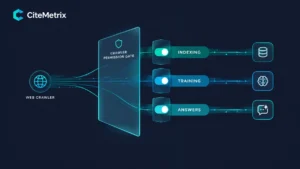
Related reading: In our earlier piece, Your Crawler Settings Are Now a Visibility Decision, Not a Technical One, we covered why search indexing, AI training, and AI answers are three separate permissions. This post is about a related but different problem: automated defaults writing policy on your behalf, and the nuance that gets dropped along the way.
What Bot Preference Sync changes
Cloudflare’s Bot Preference Sync takes higher-level AI crawler preferences and publishes corresponding directives into the robots.txt file served to visitors and crawlers.
That means a setting in a Cloudflare dashboard can become a live rule at:
https://yourdomain.com/robots.txt
The important detail from Search Engine Watch’s September 21 report is what does not come along for the ride.
Custom per-crawler exceptions are not copied into the synced policy. If your team previously created fine-grained rules for individual crawlers, those exceptions may not be represented in the automated section. Preserving that level of control still requires manual rules.
That matters because the exceptions are usually where intent lives.
A blanket policy might express:
- Allow search
- Block training
- Block agents
A considered policy might express:
- Allow Googlebot for indexing
- Allow a particular retrieval crawler for answer visibility
- Block a training crawler
- Restrict access to a sensitive directory
- Treat a mixed-purpose crawler differently from a training-only crawler
Those are not equivalent decisions. They only look equivalent when the policy is reduced to three large categories.
A default can be a sensible starting point. It is not necessarily your finished policy.

The timing problem: coverage is uneven
There is another complication: the rollout is still directional and evolving.
Search Engine Watch reported that Bing’s support for the relevant opt-out signal is not expected until early 2027. So a policy that appears coherent in your dashboard may not have identical coverage across search and AI systems today.
That is not unusual for a new control layer. It is simply a reason to avoid treating a rollout announcement as proof that your desired behavior is already universal.
There is also a basic technical distinction worth keeping in view:
A
robots.txtrule is a request. It is not an enforcement mechanism.
Compliant crawlers may follow it. A CDN, WAF, bot-management system, authentication layer, or server rule can still block or allow traffic independently. Conversely, a crawler may reach the server even when robots.txt says it should not.
The file is part of the policy. It is not the whole policy.
A practical robots.txt audit checklist
Run this audit before changing anything. Then run it again after the change.
1. Read the live file
Open your production robots.txt directly. Do not rely only on the version in Git, your CMS, or a Cloudflare dashboard.
Confirm:
- Which AI crawlers are listed
- Which paths are allowed or disallowed
- Whether a Cloudflare-managed section has been added
- Whether the file has changed from the version your team expects
2. Identify inherited defaults
Ask whether each rule reflects a deliberate decision or an inherited default.
A rule can be technically valid and strategically wrong. “It came with the platform” is not a visibility strategy, although it is a very efficient way to acquire one.
3. Check your exceptions
Find the per-crawler rules your team set previously.
Then confirm whether they survived the transition to Bot Preference Sync. Pay particular attention to rules for:
- Search crawlers
- Retrieval and answer crawlers
- Training crawlers
- Mixed-purpose crawlers
- High-value content directories
If a distinction matters to your business, write it explicitly and maintain it manually where necessary.
4. Check the CDN and WAF layer
Review Cloudflare, your WAF, bot-management rules, firewall expressions, and rate limits.
Blocking may be happening before a crawler ever requests a page. That will not necessarily appear in robots.txt.
5. Verify server responses
Use server logs to confirm that the search crawlers you want are still receiving successful responses.
For important paths, check whether the relevant crawler is receiving:
200 OK- A redirect
- A
403or other blocked response - A timeout
- A challenge page instead of the intended content
A rule that says “Allow” is not enough if the server is returning a block.
6. Answer the policy questions independently
Do not collapse these into one setting:
- Do you want this content indexed?
- Do you want it used for AI training?
- Do you want it eligible to appear in AI-generated answers?
These are separate business and governance questions. Document the answer to each one with input from marketing, legal, product, and content operations. This is brand knowledge governance in practice: deciding how your organization is represented, accessed, and reused across systems.
7. Record your baseline metrics
Before changing the policy, record what is happening now.
Capture:
- AI crawler visits
- Search crawler status codes
- Citation rate for relevant queries
- The pages currently cited
- AI-referred traffic
- Your current ModelScore and Technical Readiness score
Otherwise, a change becomes a story you tell yourself rather than an experiment you can evaluate.
The source question: what is AI actually reading?
The second story makes the audit more urgent.
In its September 21 report, Search Engine Watch covered public Gemini Notebook pages, formerly associated with NotebookLM, that were indexable and included coupon and promotional content. Search Engine Watch confirmed that some of those pages were indexable.
It also explicitly could not verify cause and effect.
That caveat matters. The reporting does not prove that those pages caused a particular AI answer, ranking outcome, or retrieval event. It does show why indexable third-party artifacts deserve attention when they can potentially enter a system’s source set.
The practical takeaway is not “NotebookLM is being gamed.” The practical takeaway is simpler:
You cannot know which sources are shaping AI answers for your category unless you inspect them systematically.
For a query such as “best project management software for a distributed team,” the relevant source may be:
- Your product page
- A review site
- A community discussion
- A public document
- A competitor comparison
- An unexpected third-party artifact
Source awareness is now part of technical and editorial monitoring.

Access decides what can be read. Sources decide what is used.
These two issues are connected, but they are not the same.
Crawler policy determines what a system can access. Source awareness helps you understand what it actually uses once access is possible.
One is the gate. The other is the evidence.
The Zyppy Signal Google AI Ranking Factors survey, published September 16 and based on ratings from more than 130 search professionals, placed AI crawl access and snippet eligibility at the top of its factor list, with a reported average score of +2.20 on a -3 to +3 scale. That is a survey of expert opinion, not proof of a universal ranking formula. Still, the logic is hard to dispute: a page that cannot be accessed or reused cannot be cited from that page.
CiteMetrix helps make both sides observable.
Nine built-in features are especially relevant here:
- AI Crawlers: shows which AI crawlers visited your site, when, and how often. This is traffic your normal web analytics may not show. It is also the inside confirmation that a settings change worked, rather than an inference based on a rollout announcement.
- Robots Analyzer: reads and interprets your live
robots.txtdirectives for AI crawlers, making inherited rules visible. - Site Crawl: crawls up to 500 pages, three levels deep, at one request per second, while respecting
robots.txt. A typical crawl takes 10–20 minutes. Starter supports 250 pages; Professional and above support 500. - Source Pages — shows exactly which pages, yours and competitors’, AI responses cite.
- Content Change Tracker: stores structured snapshots of titles, meta descriptions, headings, word count, links, schema, canonicals, and content hashes.
- Technical Readiness: the 15% component of ModelScore covering crawlability, schema, and
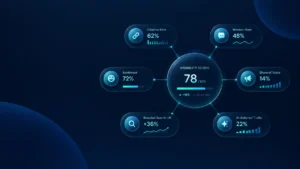
llms.txt. - ModelScore: combines Mention Score at 45%, Brand Demand at 20%, Authority Transfer at 20%, and Technical Readiness at 15%.
- AI Coaching — turns findings into practical next steps.
- Report Analysis — helps explain what changed and why it matters.
ModelScore’s four components give the measurement a useful structure:
- Mention Score, 45%: citation frequency, sentiment, and prominence across nine engines
- Brand Demand, 20%: branded searches from Google Search Console
- Authority Transfer, 20%: AI-referred traffic from GA4 or Adobe Analytics
- Technical Readiness, 15%: schema, crawlability, and
llms.txt
CiteMetrix monitors nine AI platforms on every plan: ChatGPT, Perplexity, Claude, Google AI Overview, Google Gemini, xAI Grok, Mistral, DeepSeek, and Copilot.
Everything is included. Nothing extra. Plans start at $79 per month.
Measure the change, not the intention
The right workflow is:
Monitor → Detect → Diagnose → Fix → Verify
If Bot Preference Sync changes your live crawler policy, you should be able to see:
- What changed in
robots.txt - Which exceptions disappeared
- Whether crawlers still reached the site
- Whether search crawlers still received
200responses - Whether citation patterns moved afterward
- Whether the pages being cited changed
Use Site Crawl to check reachability beyond the few pages everyone remembers. Use Source Pages to see what AI actually cites. Use Content Change Tracker to determine whether a robots change occurred in the same window as a citation movement.
And use Understanding Your ModelScore to keep the result tied to a broader visibility measurement rather than one noisy crawler event.
The point is not to reject automation. The point is to know what automation decided.
Your robots.txt may now be written for you. Your visibility policy should not be.
Ready to see what AI can access, cite, and say about your brand? Get your ModelScore → citemetrix.com